The Discord Command Center: One Interface for Your Entire AI Stack
Your AI systems are running. You just can't see them. The fix isn't more dashboards — it's one persistent interface that tells you everything, everywhere.
Your AI systems are running. You're just flying blind.
Crons are firing. Pipelines are executing. Agents are publishing content, sending alerts, writing code. And you have no idea which ones succeeded, which ones silently failed, or which ones are currently broken.
That is not an AI problem. That is an observability problem.
The difference between a system and a system you trust is visibility.
You cannot trust what you cannot see.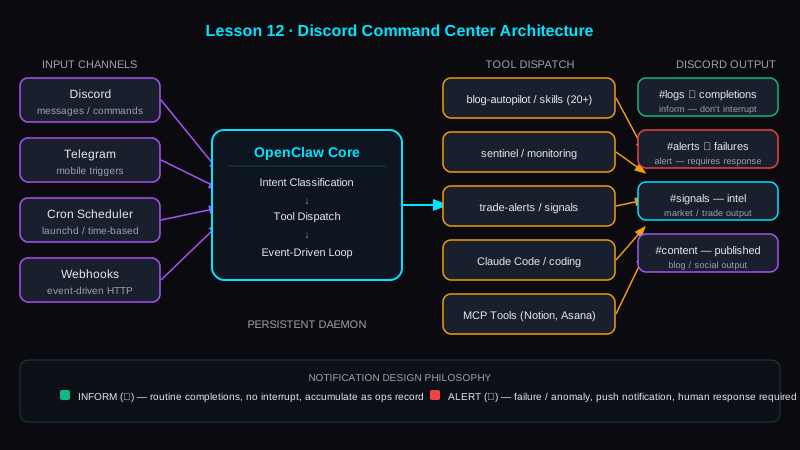
Why Discord Wins as the Command Interface
Every developer has a preferred alerting stack. PagerDuty. Slack. Email. Custom dashboards. Most of them fail the same way: they require you to go somewhere else to check status.
Discord is different. It is persistent, mobile-accessible, channel-organized, and webhook-friendly. More importantly, it is already where you live. Your community is there. Your team is there. Your working context is there.
The insight is not "use Discord instead of your dashboard." The insight is: make Discord the dashboard. Route every automated output there. Now your command center is the app you have open anyway.
Three properties make Discord the right choice:
- Webhook ingestion — any script, cron, or agent can POST a notification in 3 lines of code
- Channel organization — one channel per domain. Logs, alerts, signals, content output — each in its lane.
- Mobile persistence — phone buzzes for 🚨 alerts. Desktop accumulates ✅ completion logs. Nothing slips.
The Architecture: Everything Goes Through the Logs Channel
The foundational rule is non-negotiable: no silent successes, no silent failures.
Every automated output gets logged. Not just failures — completions too.
Blog published → log it. Cron job completed → log it. System alert → log it. Pipeline failed → log it. Token threshold crossed → log it.
This is not noise. This is the operational heartbeat of your AI stack. When you can scroll back through your logs channel and reconstruct exactly what happened over the last 24 hours — that is operational confidence.
The architecture that makes this work:
Input layer — Discord messages and commands arrive. OpenClaw parses intent: is this a command trigger, a direct message, or a cron-fired notification?
Decision engine — OpenClaw classifies the input and routes to the appropriate skill or tool. A !signal-drop command fires the signal-drop pipeline. A scheduled cron fires automatically without human input.
Tool dispatch — Skills execute: blog-autopilot publishes, sentinel runs health checks, trade-alerts evaluate market conditions.
Output routing — Results go to Discord. Logs channel for operational output. Alert channel for failures. Content channels for published material.
This loop — receive, classify, execute, log — runs 24/7. You do not have to be present for it to work. But when something breaks, you know immediately because the logs channel is the source of truth.
Notification Design Philosophy: Inform vs. Alert
Not all notifications are equal. Treating them equally is how you create alert fatigue and start ignoring everything.
Two categories. Hard boundary between them.
Inform — routine completion. ✅ green check. Blog published. Cron completed. Signal-drop delivered. These go to logs. They do not interrupt. You read them when you look. They accumulate as a record.
Alert — failure or anomaly. 🚨 red alert. Pipeline failed. Health check down. API rate limit hit. Token expired. These trigger push notifications. They require a human response within a defined window.
The design rule: alerts should be rare. If your alerts channel fires 20 times a day, you have a classification problem. Anything that fires at that frequency should be downgraded to inform — or better, should be fixed so it stops firing.
Alert fatigue is not just annoying. It is operationally dangerous. When everything is urgent, nothing is. Engineers learn to ignore noisy alert channels — which means when the real failure happens, no one notices.
Design for signal-to-noise ratio from day one.
Bot Architecture Rules
Three rules that prevent the most common failure modes:
Always include User-Agent. Discord's API requires it. DiscordBot (https://yourdomain.app, 1.0) on every request. Omit it and requests fail mysteriously.
Rate limit awareness. Discord enforces per-channel rate limits. Batch notifications if you're firing high-frequency events. Space them. A pipeline that sends 50 messages in 2 seconds will get throttled and lose messages silently.
Channel hygiene. Every log going to the right channel is a discipline problem, not a technical one. Automated output does not go to community channels. Alerts do not go to logs channels. Enforce this from the first pipeline you build — retrofitting it later is expensive.
The Event-Driven Pattern
The most powerful version of this architecture is not polling. It is event-driven.
OpenClaw does not check Discord every minute to see if something happened. Discord events fire OpenClaw. A message arrives → event fires → OpenClaw wakes, evaluates, responds. No wasted cycles. No latency introduced by polling intervals.
This matters at scale. When you have 20+ skills and 8+ crons all reporting to the same system, a polling architecture starts to fall apart. Event-driven stays fast regardless of how many sources are feeding it.
The same principle applies in reverse: when a cron completes, it fires a webhook to Discord immediately. Not batched. Not queued. The log entry exists within seconds of the task completing.
Lesson 12 Drill
Identify the most important automated workflow you run. The one where failure would cost you the most — a daily report, a trading alert, a content pipeline.
Set up one Discord webhook for that workflow. POST a ✅ completion message on success. POST a 🚨 failure message with the error on failure.
That is your first operational log entry. Build from there.
Bottom Line
Most AI builders wire up systems and then wonder why they don't trust them.
The answer is always the same: no visibility. No logs. No signal when something breaks.
Discord is not the only solution. It is the fastest path to a command center you will actually use. Route your outputs there, enforce the inform vs. alert split, and inside two weeks you will have more operational confidence in your AI stack than you have had in two years.
Visibility is not a nice-to-have. It is the precondition for trust.
Explore the Invictus Labs Ecosystem