The Memory Layer: How AI Agents Compound Knowledge Over Time
An AI that forgets everything every session isn't an agent. It's an expensive calculator. The memory layer is what separates a tool from a system that compounds.
Every session starts fresh. That's the default — and it's a trap.
Without memory architecture, you are retraining your agent every time you open a conversation. You explain your git preferences again. You re-establish your voice again. You re-state the project conventions again. This isn't an AI operating system. It's an expensive search engine with extra steps.
The Compounding Problem
A new agent with no memory is smart but context-blind. It doesn't know your stack, your preferences, your past mistakes, or your current priorities. It will give you generic answers to specific problems because it has no signal about what "specific" means in your context.
Session 1 is slow. You spend 30% of the conversation establishing context before doing any real work.
Session 100, if you've built the memory layer correctly, is fast. The agent arrives knowing your git workflow, your brand voice, your production infrastructure, your recurring failure patterns, and your active projects. It doesn't need to ask. It reads.
Compounding context is the mechanism that makes an AI system dramatically more valuable the longer you run it. Without it, every session is session 1. With it, the system gets smarter over time without any additional training.
Three Types of Memory in an AI OS
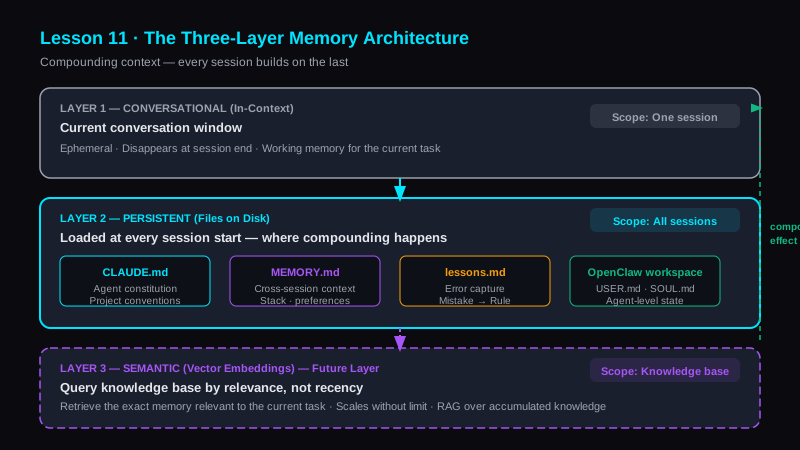
Not all memory is the same. There are three distinct layers with different scopes, lifetimes, and mechanisms.
Layer 1 — Conversational (In-Context). The current conversation window. Ephemeral. Disappears when the session ends. This is the working memory — useful within a task, zero persistence beyond it. Most people treat this as the only memory layer that exists. It's the least important one at the system level.
Layer 2 — Persistent (Files). Written to disk. Loaded at session start. This is where compounding happens. CLAUDE.md lives here. MEMORY.md lives here. lessons.md lives here. The agent reads these files at the start of every session and arrives with full context. This is the layer that turns a tool into an operating system.
Layer 3 — Semantic (Embeddings). Vector search over a knowledge base. The future layer. Instead of loading a flat file with 200 lines of context, the agent queries a vector database and retrieves the specific memories relevant to the current task. This is where large-scale knowledge accumulation becomes tractable. We're not running this in production yet — but it's the direction.
The Memory Architecture We Built
The persistent layer has four distinct files, each with a specific scope:
CLAUDE.md — the agent constitution. Project conventions, architectural decisions, do-nots, deployment rules, and tool configuration. This is the agent's DNA for a specific project. It answers "how do we do things here?" Every project gets one. It lives in the project root and Claude Code loads it automatically.
MEMORY.md — cross-session persistent context. Who Knox is, active projects, git preferences, infrastructure patterns, Python compatibility constraints, Discord rules, cron architecture principles. This is the accumulated understanding of the human's context that should persist across every session, regardless of which project is active.
lessons.md — per-project error capture. After any correction, a new entry is written: what went wrong, why, and the rule that prevents recurrence. This is the mechanism that turns mistakes into institutional knowledge instead of recurring costs.
OpenClaw workspace — USER.md, TOOLS.md, SOUL.md, MEMORY.md — OpenClaw's persistent state across its own sessions, separate from the coding agent's context.
The Lessons Escalation Ladder
Mistakes are inevitable. The question is whether they compound or get resolved.
The escalation ladder:
- Mistake happens → write the entry in
lessons.md. Format: what went wrong, root cause, rule to prevent recurrence. - Same mistake happens again → the lesson wasn't strong enough. Escalate it to
CLAUDE.md. - Mistake persists across projects → it's a systemic pattern, not a project-specific one. Escalate to
MEMORY.md.
Every correction that isn't captured is a correction you'll make again. The lessons escalation ladder is how you convert single-point failures into permanent system improvements. Skip the capture step and you're running the same risk in every future session.
If a lesson keeps appearing in lessons.md without resolving, the rule isn't specific enough. Make it a hard constraint. Make it a check in the workflow. Escalate until the failure mode is structurally impossible.
Why Files Beat Prompts for Memory
You could attempt to handle memory by including a long context prompt at the start of every conversation. This breaks down in three ways.
First, you have to remember to include it. Human memory is unreliable. File loading is automatic.
Second, context windows have limits. A flat context prompt doesn't scale with the volume of accumulated knowledge. A file system does.
Third, files are versionable, auditable, and collaborative. MEMORY.md is a git artifact. You can see when a preference changed, why, and what triggered the update. A context prompt is ephemeral.
The agent's memory should live where the agent can reliably access it — not in your head, not in a sticky note, not in a prompt template you have to remember to paste. Write it to disk. Load it every session. Iterate on it.
The Compound Effect in Practice
Session 1: the agent doesn't know that bare str | None type hints fail on Python 3.9.6. You hit the error, you fix it, you write the lesson. Two minutes.
Session 2: MEMORY.md says "system Python is 3.9.6, always use from __future__ import annotations." The agent uses the correct syntax from the start. The error never occurs again.
Session 100: the accumulated context means the agent knows your infrastructure, your voice, your failure patterns, your active projects, and your preferences at a level that would take a human collaborator months to develop. And that context loaded automatically in under a second.
That's the compound effect — not metaphorical compounding, but literal: each session builds on the accumulated output of every previous session.
Lesson 11 Drill
Create a MEMORY.md file for your most-used AI workflow. Write five preferences the agent should know going into every session.
Start with the basics: your name and role, your primary stack, your git workflow, one production convention that trips up AI by default, and one correction you've made more than once. Five entries. That's the seed. Build from there.
The file you write today will be the context that saves you time in every future session.
Bottom Line
Memory is the difference between a tool and a system. A tool is as good as your last prompt. A system gets better every time you run it.
Build the persistent layer — CLAUDE.md, MEMORY.md, lessons.md — before you need it. The earlier you start capturing context, the more sessions benefit from the compound effect.
Session 1 is always slow. Session 100 should feel like working with someone who knows you.
Explore the Invictus Labs Ecosystem